
by Christopher Mohr
Day 64 of 100 in the 100 Days of Cyber Challenge
The ‘Tuesday’ edition of Malware Monday is brought to you by the Indiana Hoosiers and my job search. No apologies for the former. It was a historical day in the making, but today’s MM edition comes a day later than expected.
Why I Set the Honeypots Up
If you have been following my recent LinkedIn posts regarding the 100 Days of Cyber Challenge, you may have noticed a sudden interest in honeypots.
I set a honeypot up to learn more about the defensive aspects of cybersecurity. My background is in database development, writing SQL code mostly, and I do not have much of an IT admin or Linux background.
Many of my recent LinkedIn posts related to the Challenge have been about Linux commands and since the honeypot is an Ubuntu machine, this is a continuation of Linux self-education.
I set up two honeypots. One ran for 16 hours before I shut it down; the other has been running for nearly 64 hours (as of 11:15 PM 19 January 2026 UTC) and is still active.
Both machines were Ubuntu virtual machines running on the Digital Ocean cloud as SSH servers. There are no user accounts other than root, and root has no password; you authenticate through an SSH key. Brute-force attempts to access the honeypot fail because there are no user accounts and there are no passwords. You would have to steal the SSH key or guess it to login.
All failed attempts to login get saved to a log which provides interesting information about attacks.

The Internet is Under Constant Attack
One of the most eye-opening lessons I learned is that once you setup an internet-facing machine it’s probably not long before someone is trying to break into it. One honeypot I ran was up only three or four minutes and it already had numerous attack attempts.
These attacks are not personal or targeted. What’s going on is the internet equivalent of “war dialing”. The attackers have setup a range of IP addresses and are going through these addresses sequentially, trying to break into any machine with that address that gives them an opening.
Looking at attacks in real time did not make for good video content. The problem with watching attacks in real time is that on average there is an attack every 9-10 seconds. so between attempts there is a lot of “dead air/dead video” which is not appealing to users scrolling through their feed.
Nonetheless, watching these attacks appear on my screen in real time was still eye-opening and there have been a lot of attacks. As of the time of this article, there have been nearly 26,000 unauthorized attempts to login to the honeypot in 63 hours and 45 minutes.
That’s a lot of activity and these are ‘low-hanging-fruit’ attacks, part of normal internet traffic.

Attackers are Global
The following is a breakdown of attacks by IP address for each country (number of attacks, two-letter country code, full country name) attacking the honeypot :
129 NL, Netherlands
76 US, United States
17 CN, China
15 DE, Germany
14 RO, Romania
7 GB, United Kingdom
4 SG, Singapore
4 RU, Russian Federation
4 IN, India
4 AU, Australia
3 KR, Korea, Republic of
3 ID, Indonesia
3 BR, Brazil
2 VN, Vietnam
2 MY, Malaysia
2 HK, Hong Kong
2 ET, Ethiopia
2 CA, Canada
2 BG, Bulgaria
1 TW, Taiwan
1 TR, Turkey
1 SZ, Swaziland
1 SO, Somalia
1 SA, Saudi Arabia
1 PT, Portugal
1 PL, Poland
1 PH, Philippines
1 KZ, Kazakhstan
1 JP, Japan
1 IT, Italy
1 IP Address not found
1 HU, Hungary
1 ES, Spain
1 DZ, Algeria
1 CM, Cameroon
1 AE, United Arab Emirates
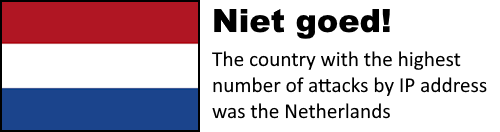
While some countries attacked the honeypot more often than others (Nederland staat op de eerste plaats, dat is slecht! and the U.S. is second, shame!) it’s easy to see that these attacks come from all over the globe!
Manual searches of some IP addresses on abuseipdb.com showed they had been reported thousands of times with 100 percent confidence they were a source of abuse.
The Usernames Tell a Story of Two Types of Attacks
A complete list of all usernames involved in the attacks would be too large for this post, but that doesn’t mean we can’t make observations.
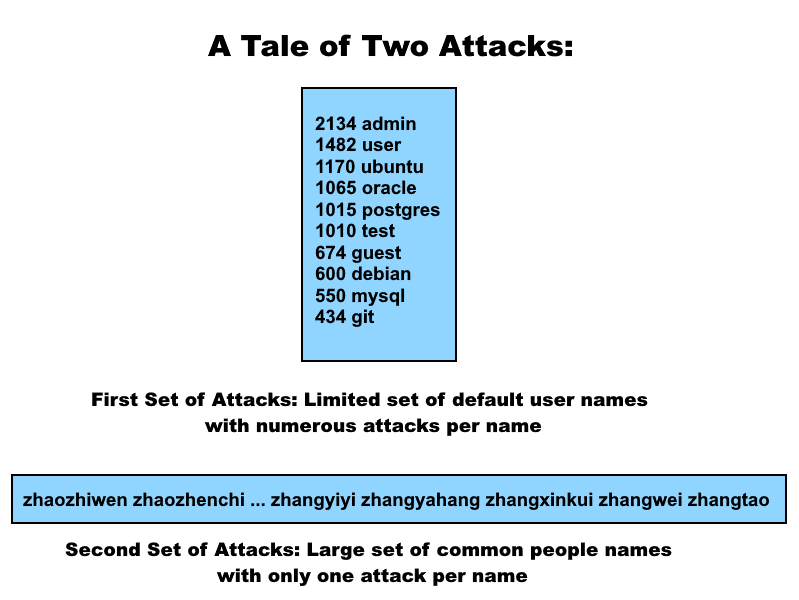
The top 10 users were as follows:
2134 admin
1482 user
1170 ubuntu
1065 oracle
1015 postgres
1010 test
674 guest
600 debian
550 mysql
434 git
These are default names in many different environments. If you have an internet-facing machine with one of these user names, then you may get breached by a spray-and-pray attack. A combination of default usernames and weak passwords along with a relentless brute force is a security nightmare waiting to become reality.
As you go down the list, which is ranked by number of attacks, you see that a lengthy list of names are tied with one attack each. Here’s a sample of ten of them:
1 zhaozhiwen
1 zhaozhenchi
1 zhaoxi
1 zhaowei
1 zhaoshu
1 zhaoqike
1 zhaoqian
1 zhaojingjing
1 zhanyi
1 zhangzx
From what little research I have conducted, these names appear to be Hanyu Pinyin, a Romanized form of Mandarin. The name ‘zhang’ is the third most common Chinese surname.
What about the ‘zx’ in ‘zhangzx’? As you go further down the list you see more names beginning with ‘zhang’:
1 zhangzh
1 zhangyutao
1 zhangyu
1 zhangyq
1 zhangyiyue
1 zhangyiyi
1 zhangyahang
1 zhangxinkui
1 zhangwei
1 zhangtao
These look like various surname-given name combinations with the surname being Zhang. One of the names, “zhangwei” or Zhang Wei is pretty common in China, with about 300,000 occurrences, according to this article from 2020.
So the ‘zx’ seems to be either a given name, an abbreviation, or an initialization of one.
This would be like an American hacking into a system in the U.S. with a common name like Mike Smith. Which Mike Smith are we talking about? In China you could ask the same question about the name Zhang Wei.
Captain Obvious here: these one-time attacks using Hany Pinyu usernames are not targeting specific people. It seems to be more along the lines of “Instead of attacking with common default account names, let’s attack with common people names instead”.
It would take further analysis to be more certain, tale of two types of attacks is that you have a vertical and a horizontal approach at work here.
The vertical approach uses a handful of default account names with a large number of login attempts per name: keep ramming at the door until you can burst through.
The horizontal approach uses a lot of common people names but only one login attempt per name: keep trying to unlock doors without being noticed.
Maybe what you can conclude about user names is that it is clearly unwise to use default user names but that it might also be wise to change your user name if it’s a common name in your country.
I’ve Learned More About Attacks and Linux in General
The frequency of the attacks has opened my eyes about how much malicious activity is out there on the internet: it’s constantly flowing. The good news is that with a little bit of effort, it’s not too difficult to prevent these attacks from succeeding.
It’s concerning that the prevailing attitude about cybersecurity seems to be that it is not important until you are breached. From what I’ve seen in this exercise, the question is not IF you will be breached, but WHEN.
I’ve learned a few Linux commands for examining logs. That does not make me a seasoned Linux system admin, but it does give me practice. If you can look at these commands in sections or parts and figure out what each part does, you can tweak these commands to present the results in a different way, like attacks per hour vs. attacks per minute.
You can apply these commands to other types of log analysis, not just auth.log. There are system logs, service logs and application logs you can look at too.
There’s Still More to Do
The more you learn about something, the more you also learn is that there is a lot you don’t know. I would like to dive deeper into the data from these logs and see what else I can learn from it.
I also want to use some defensive techniques to try to reduce the frequency of attacks, so stay tuned. More honeypot content on the way.